‹ All integrations

Lew by text: your personal assistant over SMS

On the Personal and Pro plans, you can text Lew at +1 (844) 424-0539 from the phone number you add to your account. It’s the same conversation as the app: he answers your questions, drafts messages and keeps track of your day.

Lew
You
What time is my flight Saturday?
LewAPP
6:40pm from JFK, TAP 210, seat 14A. Leave for the airport around 4.
You
Tell Mark the plumber can come Tuesday 9–11
LewAPP
Draft to Mark saved. Review and send: app.asklew.com

What Lew does

  • Answers your texts in the same conversation as the app, the web, Telegram and Slack.
  • Uses the email and calendar accounts you connected in AskLew.
  • Saves drafts for you to send from the AskLew app: a text message never sends an email.

How to connect

  1. 1Sign in at app.asklew.com and open Settings → Connections → SMS, then Add your number.
  2. 2Tick the consent box, and enter the 6-digit code we text you.
  3. 3Text Lew at +1 (844) 424-0539. Every step, word for word, is below.

What Lew can access

  • Your number is used only for your conversation with Lew, and never shared for marketing.
  • Reply STOP to stop receiving texts, START to receive them again, and HELP for help.
  • Disconnect your number in Settings → Connections at any time. Message and data rates may apply.

More in our Privacy Policy and on our Security page.

How you opt in

Texting is off until you turn it on yourself, from your AskLew account:
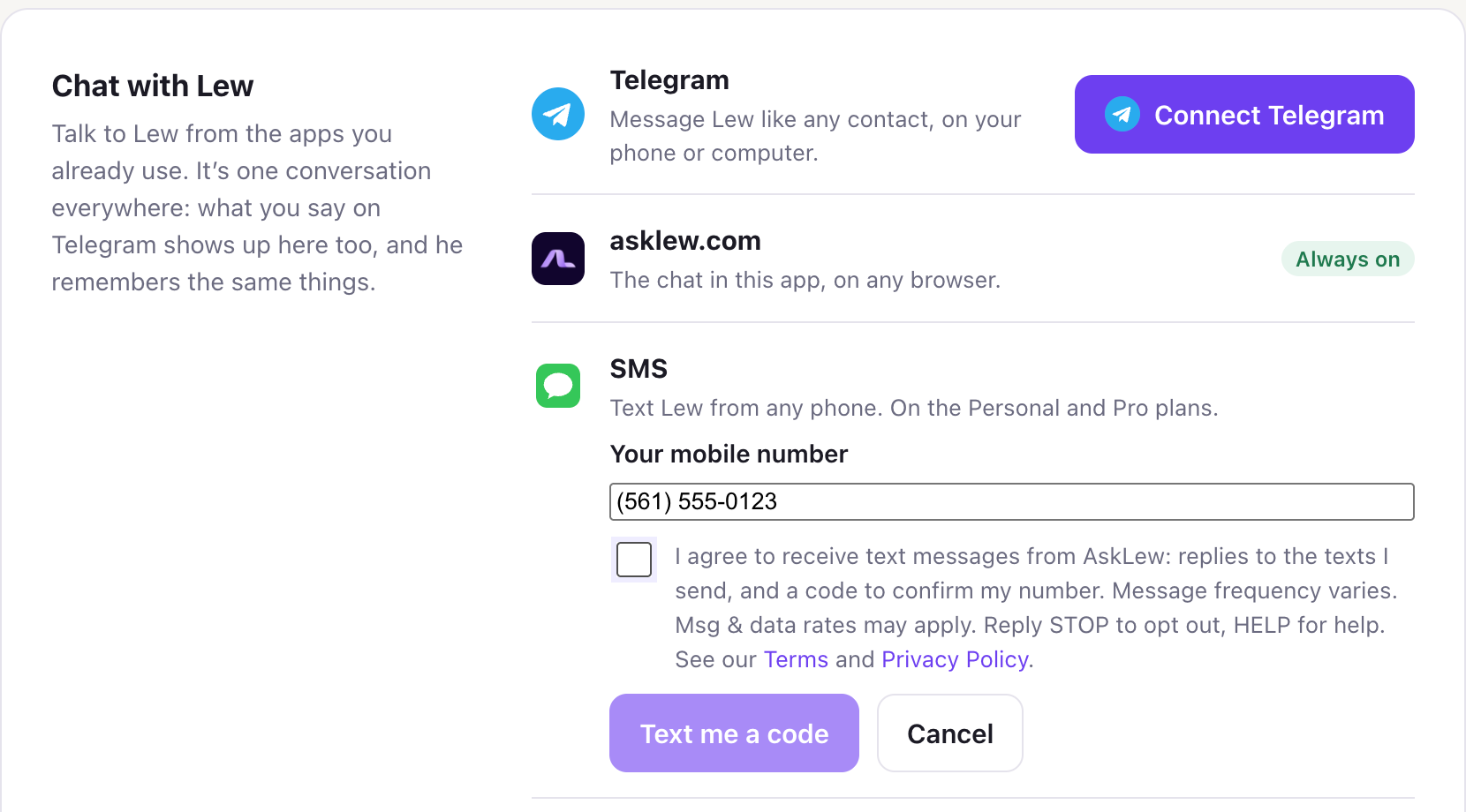
  1. Sign in at app.asklew.com and open Settings → Connections → SMS, then Add your number.
  2. Enter your mobile number and tick the consent box: “I agree to receive text messages from AskLew: replies to the texts I send, and a code to confirm my number. Message frequency varies. Msg & data rates may apply. Reply STOP to opt out, HELP for help.”
  3. We text you a 6-digit code: “AskLew: your code is 123456. It expires in 10 minutes. Msg & data rates may apply. Reply STOP to opt out.” Enter it to confirm the number is yours.
  4. You receive: “You're connected to AskLew. Text me anything, any time: questions, drafts, your day. Reply HELP for help, STOP to opt out.”
The SMS opt-in form in AskLew's Settings: a mobile number field, the consent checkbox with the text above, links to the Terms and Privacy Policy, and a Text me a code button.
The opt-in form in Settings → Connections (example number). The box is never ticked for you, and the code can't be sent until you tick it.

What you'll receive

  • Lew's replies to the texts you send him, the code that confirms your number, and notices about your use of texting, such as when your monthly allowance is nearly used.
  • No marketing. Lew doesn't text you first.
  • Message frequency varies with how much you text Lew. Message and data rates may apply.

Stopping and help

  • Reply STOP to stop receiving texts, and START to receive them again.
  • Reply HELP for help, or contact us.
  • You can also disconnect your number in Settings → Connections at any time.

Details are in our Terms and Privacy Policy. Your mobile number is never shared with third parties or affiliates for marketing or promotional purposes.

Lew also works with